TLS/SSL (Schannel SSP) 中的TLS 协议Windows版本支持

TLS/SSL (Schannel SSP) 中的TLS 协议Windows版本支持
Schannel SSP 实现 TLS、DTLS 和 SSL 协议的版本。 不同的Windows版本支持不同的协议版本。
Windows SChannel 安全套接字是 Windows 操作系统提供的一个安全套接字协议实现,包括 SSL 和 TLS。SChannel 是安全通信的基础组件之一,它提供了一系列的 API,用于在 Windows 操作系统上实现安全通信。
TLS 协议版本支持
下表显示了 Microsoft Schannel 提供程序对 TLS 协议版本的支持。
| Windows OS | TLS 1.0 客户端 | TLS 1.0 服务器 | TLS 1.1 客户端 | TLS 1.1 服务器 | TLS 1.2 客户端 | TLS 1.2 服务器 | TLS 1.3 客户端 | TLS 1.3 服务器 |
|---|---|---|---|---|---|---|---|---|
| Windows Vista/Windows Server 2008 | 已启用 | 已启用 | 不支持 | 不支持 | 不支持 | 不支持 | 不支持 | 不支持 |
| Windows Server 2008 with Service Pack 2 (SP2) | 已启用 | 已启用 | 已禁用 | 已禁用 | 已禁用 | 已禁用 | 不支持 | 不支持 |
| Windows 7/Windows Server 2008 R2 | 已启用 | 已启用 | 已禁用 | 已禁用 | 已禁用 | 已禁用 | 不支持 | 不支持 |
| Windows 8/Windows Server 2012 | 已启用 | 已启用 | 已启用 | 已启用 | 已启用 | 已启用 | 不支持 | 不支持 |
| Windows 8.1/Windows Server 2012 R2 | 已启用 | 已启用 | 已启用 | 已启用 | 已启用 | 已启用 | 不支持 | 不支持 |
| Windows 10 版本 1507 | 已启用 | 已启用 | 已启用 | 已启用 | 已启用 | 已启用 | 不支持 | 不支持 |
| Windows 10 版本 1511 | 已启用 | 已启用 | 已启用 | 已启用 | 已启用 | 已启用 | 不支持 | 不支持 |
| Windows 10版本 1607/Windows Server 2016 Standard | 已启用 | 已启用 | 已启用 | 已启用 | 已启用 | 已启用 | 不支持 | 不支持 |
| Windows 10 版本 1703 | 已启用 | 已启用 | 已启用 | 已启用 | 已启用 | 已启用 | 不支持 | 不支持 |
| Windows 10 版本 1709 | 已启用 | 已启用 | 已启用 | 已启用 | 已启用 | 已启用 | 不支持 | 不支持 |
| Windows 10 版本 1803 | 已启用 | 已启用 | 已启用 | 已启用 | 已启用 | 已启用 | 不支持 | 不支持 |
| Windows 10 版本 1809//Windows Server 2019 | 已启用 | 已启用 | 已启用 | 已启用 | 已启用 | 已启用 | 不支持 | 不支持 |
| Windows 10 版本 1903 | 已启用 | 已启用 | 已启用 | 已启用 | 已启用 | 已启用 | 不支持 | 不支持 |
| Windows 10 版本 1909 | 已启用 | 已启用 | 已启用 | 已启用 | 已启用 | 已启用 | 不支持 | 不支持 |
| Windows 10 版本 2004 | 已启用 | 已启用 | 已启用 | 已启用 | 已启用 | 已启用 | 不支持 | 不支持 |
| Windows 10 版本 20H2 | 已启用 | 已启用 | 已启用 | 已启用 | 已启用 | 已启用 | 不支持 | 不支持 |
| Windows 10,版本 21H1 | 已启用 | 已启用 | 已启用 | 已启用 | 已启用 | 已启用 | 不支持 | 不支持 |
| Windows 10 版本 21H2 | 已启用 | 已启用 | 已启用 | 已启用 | 已启用 | 已启用 | 不支持 | 不支持 |
| Windows Server 2022 | 已启用 | 已启用 | 已启用 | 已启用 | 已启用 | 已启用 | 已启用 | 已启用 |
| Windows 11 | 已启用 | 已启用 | 已启用 | 已启用 | 已启用 | 已启用 | 已启用 | 已启用 |
从 Windows 10 版本 1607 和 Windows Server 2016 开始,SSL 2.0 已删除,不再受支持。
更新补丁
如果系统不支持,可以通过更新补丁的方式,让系统支持TLS版本
Windows 7 SP1 和 Windows Server 2008 R2 SP1
TLS1.2补丁
KB3080079:安全更新,支持 TLS 1.2 和 DTLS 1.2。KB3140245:更新程序,包含支持 TLS 1.2 的加密算法和密码套件。
TLS1.3补丁
KB5003620:还包括安全性更新,以确保系统中的加密通信协议更加安全。
需要注意的是,补丁的具体作用可能因操作系统版本和更新的时间而有所不同,也可能并不支持 TLS 1.3
Windows 8.1 和 Windows Server 2012 R2
TLS1.2补丁
KB2977292:安全更新,支持 TLS 1.2 和 DTLS 1.2。KB3140245:更新程序,包含支持 TLS 1.2 的加密算法和密码套件。
TLS1.3补丁
KB5003612:包括安全性更新,以确保系统中的加密通信协议更加安全。
Windows 10 和 Windows Server 2016/2019
TLS1.2补丁
KB3147461:安全更新,支持 TLS 1.2 和 DTLS 1.2。KB3172614:更新程序,包含支持 TLS 1.2 的加密算法和密码套件。
TLS1.3补丁
KB5003611:安全更新,支持 TLS 1.3 和 DTLS 1.3。KB5004244:更新程序,包含支持 TLS 1.3 的加密算法和密码套件。
检测Win支持的TLS版本
检测系统支持的TLS版本
- 系统搜索
Windows PowerShell,打开窗口输入:
Add-Type -AssemblyName System.ServiceModel
[System.Enum]::GetNames([System.Net.SecurityProtocolType])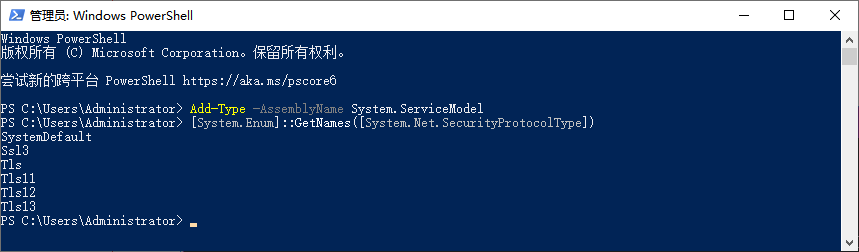
推荐开启TLS工具
从 https://www.nartac.com/Products/IISCrypto 下载并安装 IIS Crypto 工具。
启动 IIS Crypto 工具,并选择“Best Practices”选项卡。
在该选项卡中,您可以看到所需的所有 TLS 版本和密码套件的默认设置。如果要启用 TLS 1.3,请确保选择 TLS 1.3 选项框。此外,您可以自定义密码套件列表。
单击“Apply”按钮以应用更改。
重启系统以使更改生效。
请注意,在更改 TLS 版本和密码套件之前,您应该先备份当前的 SSL/TLS 配置以便可以恢复到先前的配置。
参考文档
TLS/SSL (Schannel SSP) 中的协议 - Win32 apps | Microsoft Learn
Windows Server 2008配置
支持 TLS 1.2 和 TLS 1.1 需要更新。 请参阅更新以在 Windows Server 2008 SP2 中添加对 TLS 1.1 和 TLS 1.2 的支持。