# 查看Navicat保存的密码 ## 问题 > 时间久了,当我们以前连上了navicat 之后,密码忘记了,但是依然能连接,此时我们想查看密码,应该如何操作呢? ## 解决 ## PHP在线解密 ### 步骤1、导出 点击navicat 文件选项,导出连接 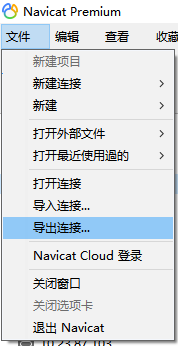 注意:勾选需要导出的数据库,导出的时候一定**要勾选导出密码** 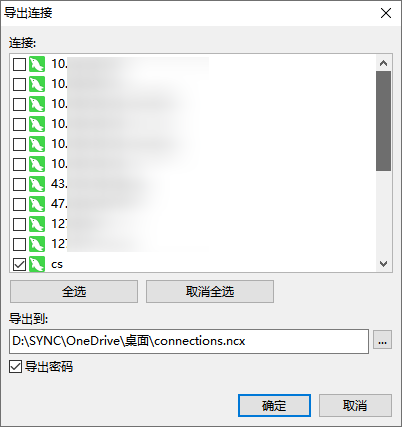 导出之后,我们会得到一个`connections.ncx`文件中找到`password`,然后复制出来 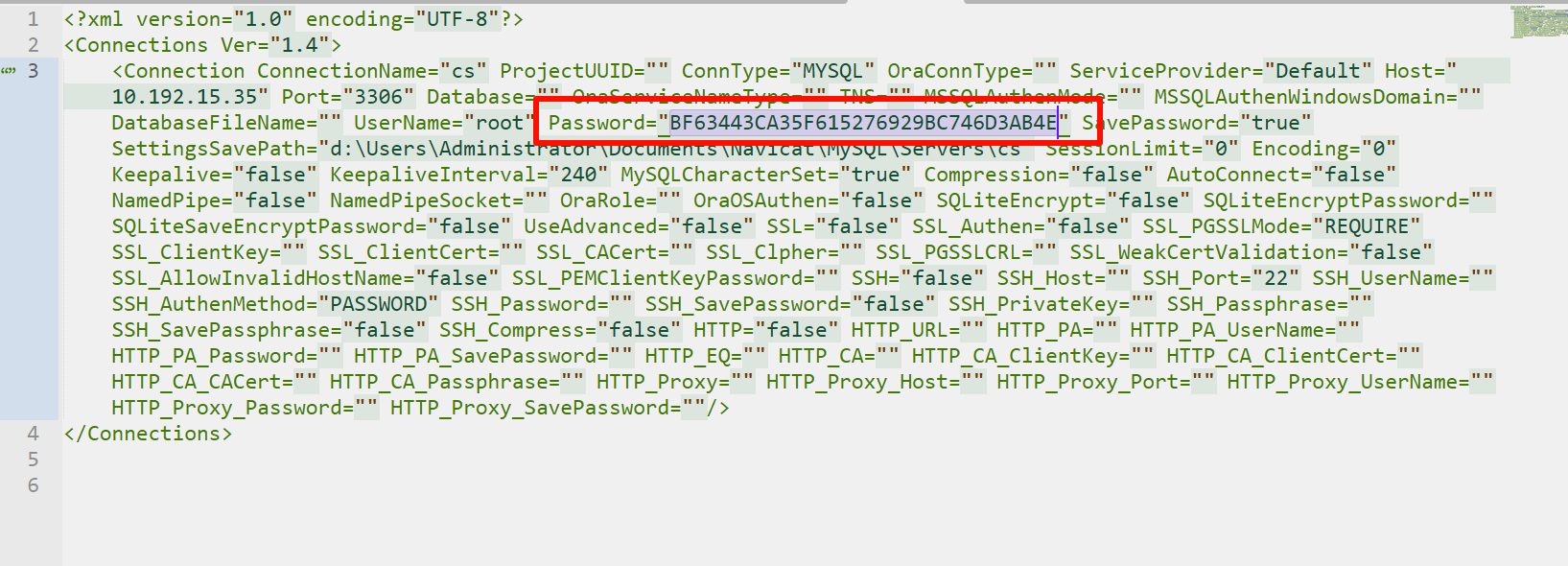 复制出来password内容 然后我们要对这个password 密码进行解密。 ### 步骤2、解密 打开小工具 网站: - https://www.w3cschool.cn/tryrun/runcode?lang=php 将如下PHP代码复制进去: ```php <?php class NavicatPassword { protected $version = 0; protected $aesKey = 'libcckeylibcckey'; protected $aesIv = 'libcciv libcciv '; protected $blowString = '3DC5CA39'; protected $blowKey = null; protected $blowIv = null; public function __construct($version = 12) { $this->version = $version; $this->blowKey = sha1('3DC5CA39', true); $this->blowIv = hex2bin('d9c7c3c8870d64bd'); } public function encrypt($string) { $result = FALSE; switch ($this->version) { case 11: $result = $this->encryptEleven($string); break; case 12: $result = $this->encryptTwelve($string); break; default: break; } return $result; } protected function encryptEleven($string) { $round = intval(floor(strlen($string) / 8)); $leftLength = strlen($string) % 8; $result = ''; $currentVector = $this->blowIv; for ($i = 0; $i < $round; $i++) { $temp = $this->encryptBlock($this->xorBytes(substr($string, 8 * $i, 8), $currentVector)); $currentVector = $this->xorBytes($currentVector, $temp); $result .= $temp; } if ($leftLength) { $currentVector = $this->encryptBlock($currentVector); $result .= $this->xorBytes(substr($string, 8 * $i, $leftLength), $currentVector); } return strtoupper(bin2hex($result)); } protected function encryptBlock($block) { return openssl_encrypt($block, 'BF-ECB', $this->blowKey, OPENSSL_RAW_DATA|OPENSSL_NO_PADDING); } protected function decryptBlock($block) { return openssl_decrypt($block, 'BF-ECB', $this->blowKey, OPENSSL_RAW_DATA|OPENSSL_NO_PADDING); } protected function xorBytes($str1, $str2) { $result = ''; for ($i = 0; $i < strlen($str1); $i++) { $result .= chr(ord($str1[$i]) ^ ord($str2[$i])); } return $result; } protected function encryptTwelve($string) { $result = openssl_encrypt($string, 'AES-128-CBC', $this->aesKey, OPENSSL_RAW_DATA, $this->aesIv); return strtoupper(bin2hex($result)); } public function decrypt($string) { $result = FALSE; switch ($this->version) { case 11: $result = $this->decryptEleven($string); break; case 12: $result = $this->decryptTwelve($string); break; default: break; } return $result; } protected function decryptEleven($upperString) { $string = hex2bin(strtolower($upperString)); $round = intval(floor(strlen($string) / 8)); $leftLength = strlen($string) % 8; $result = ''; $currentVector = $this->blowIv; for ($i = 0; $i < $round; $i++) { $encryptedBlock = substr($string, 8 * $i, 8); $temp = $this->xorBytes($this->decryptBlock($encryptedBlock), $currentVector); $currentVector = $this->xorBytes($currentVector, $encryptedBlock); $result .= $temp; } if ($leftLength) { $currentVector = $this->encryptBlock($currentVector); $result .= $this->xorBytes(substr($string, 8 * $i, $leftLength), $currentVector); } return $result; } protected function decryptTwelve($upperString) { $string = hex2bin(strtolower($upperString)); return openssl_decrypt($string, 'AES-128-CBC', $this->aesKey, OPENSSL_RAW_DATA, $this->aesIv); } }; //需要指定版本两种,11或12 //$navicatPassword = new NavicatPassword(11); //这里我指定的12的版本,原先指定的11,执行之后的密码是乱码 $navicatPassword = new NavicatPassword(12); //解密 //$decode = $navicatPassword->decrypt('15057D7BA390'); $decode = $navicatPassword->decrypt('BF63443CA35F615276929BC746D3AB4E'); echo $decode."\n"; ?> ``` 把你的密码修改,然后点击**运行代码**,右边运行得到密码。 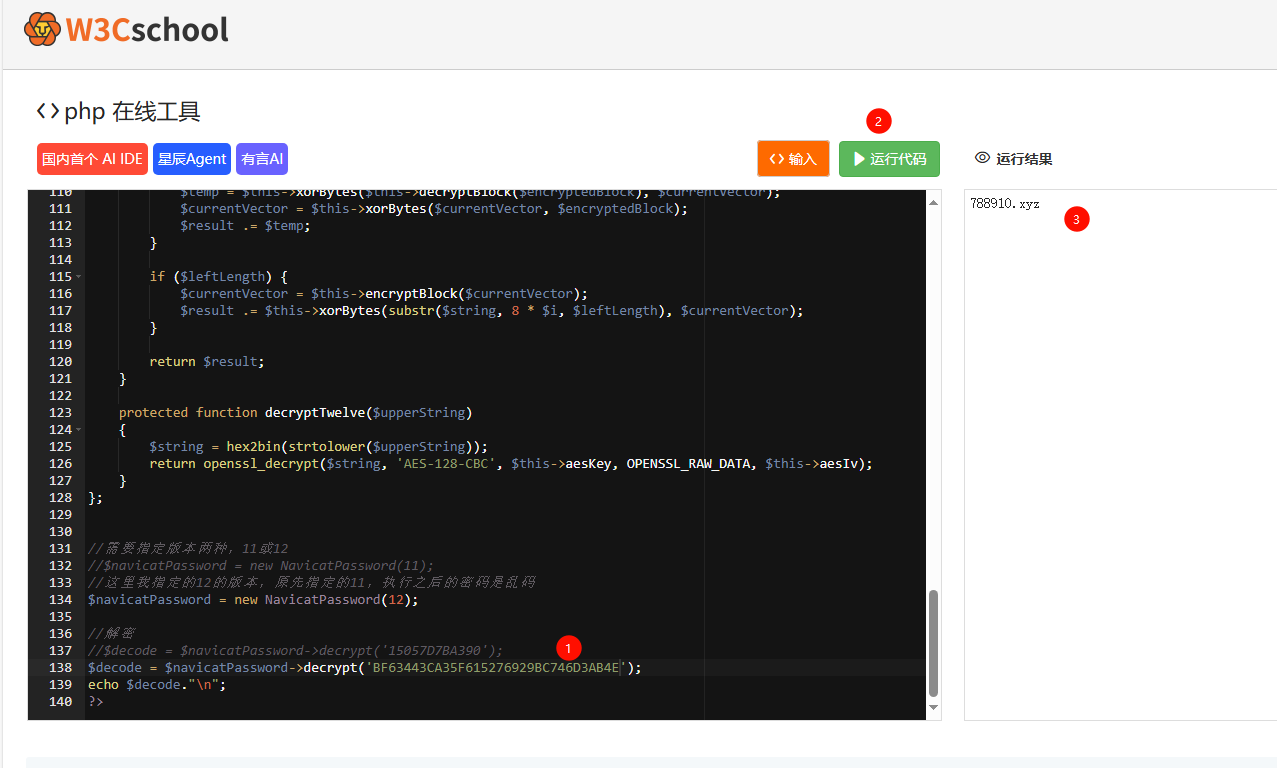 ## Python解密 ### python 代码 [navicat 加密方式](https://github.com/HyperSine/how-does-navicat-encrypt-password) ```python # -*- coding: utf-8 -*- from Crypto.Cipher import AES from binascii import b2a_hex, a2b_hex # 如果text不足16位的倍数就用空格补足为16位 def add_to_16(text): if len(text.encode('utf-8')) % 16: add = 16 - (len(text.encode('utf-8')) % 16) else: add = 0 text = text + ('\0' * add) return text.encode('utf-8') # 加密函数 def encrypt(text): key = 'libcckeylibcckey'.encode('utf-8') mode = AES.MODE_CBC iv = b'libcciv libcciv ' text = add_to_16(text) cryptos = AES.new(key, mode, iv) cipher_text = cryptos.encrypt(text) print(b2a_hex(cipher_text)) # 因为AES加密后的字符串不一定是ascii字符集的,输出保存可能存在问题,所以这里转为16进制字符串 return b2a_hex(cipher_text) # 解密后,去掉补足的空格用strip() 去掉 def decrypt(text): key = 'libcckeylibcckey'.encode('utf-8') iv = b'libcciv libcciv ' mode = AES.MODE_CBC cryptos = AES.new(key, mode, iv) plain_text = cryptos.decrypt(a2b_hex(text)) return bytes.decode(plain_text).rstrip('\0').replace('','') if __name__ == '__main__': # e=encrypt('root') d = decrypt('AE137B98AB3AD0F913EBEF2E8D3C52E9') # 解密 # print("加密:",e) print("解密:", d) ``` ### python执行结果 ```bash `解密: hzjy&flzx3qc Process finished with exit code 0` ``` ## 快照 - https://pic.rmb.bdstatic.com/bjh/3eec3da3a2b/250604/a9499bd50dadcc10532555a70dc5bcf6.png - https://i3.wp.com/pic.rmb.bdstatic.com/bjh/3eec3da3a2b/250604/a9499bd50dadcc10532555a70dc5bcf6.png - https://788910.xyz/api/snapshot?p=c71212af32761910397f90e64efd582d&u=https://pic.rmb.bdstatic.com/bjh/3eec3da3a2b/250604/a9499bd50dadcc10532555a70dc5bcf6.png
